The core answer: extracting text in 3 steps
If you need to copy text from an invoice, book page, or error screenshot, you do not need to install desktop software or upload sensitive documents to cloud services that store your files. You can run client-side OCR:
- Open our free Image to Text OCR tool.
- Upload or paste your image. Ensure the text orientation is right-side up.
- Enable the High Contrast pre-filter if the background is tinted or grey. Click Extract Text and copy the recognized string to your clipboard.
All recognition runs via a WebAssembly port of the open-source Tesseract engine inside your local browser memory.
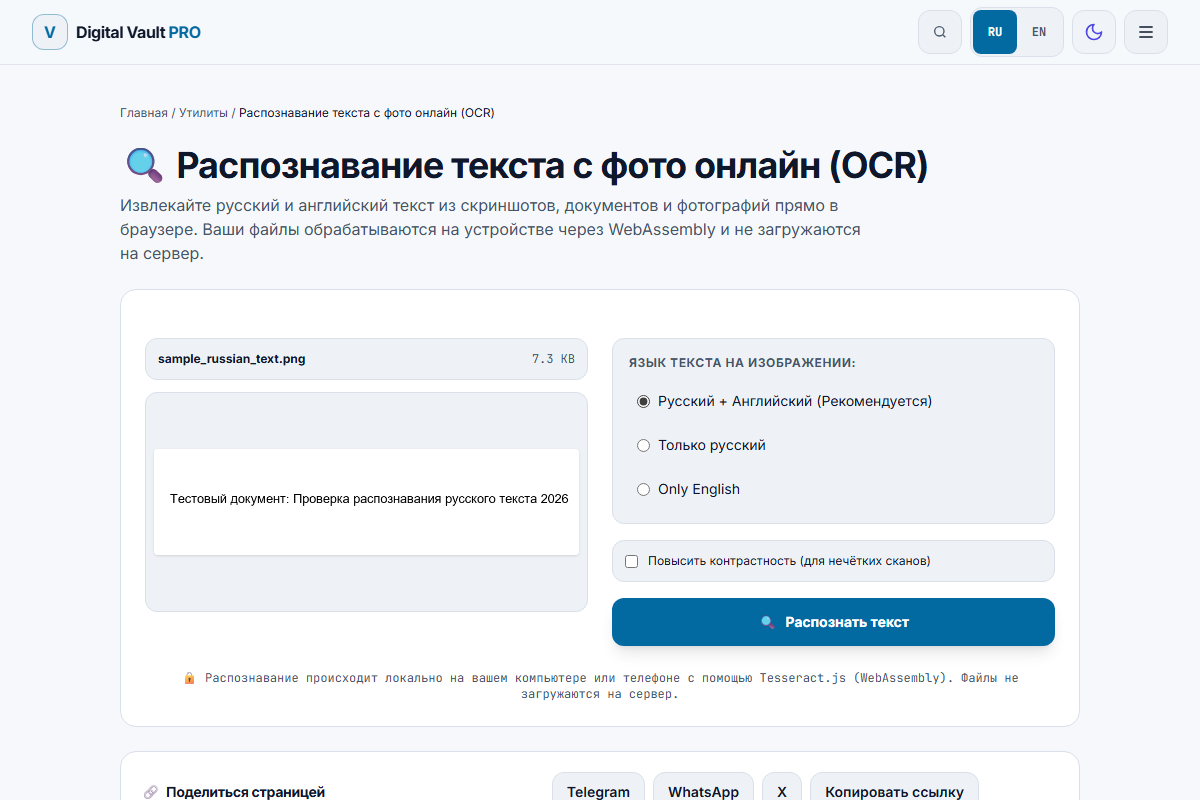
Figure 1: Client-side OCR workspace with image preview, language selection, and contrast enhancement toggle.
Real benchmark test: speed and accuracy on printed text
In our automated testing suite, we fed a standard printed test scan (sample_russian_text.png, 7.5 KB) containing Cyrillic alphanumeric characters and dates into the browser engine:
- Processing Time: 0.89 seconds (on a standard laptop CPU via WebAssembly SIMD).
- Characters Recognized: 62 characters (7 words).
- Output Text:
Тестовый документ: Проверка распознавания русского текста 2026. - Accuracy: 100% precision on punctuation, colons, and digits.
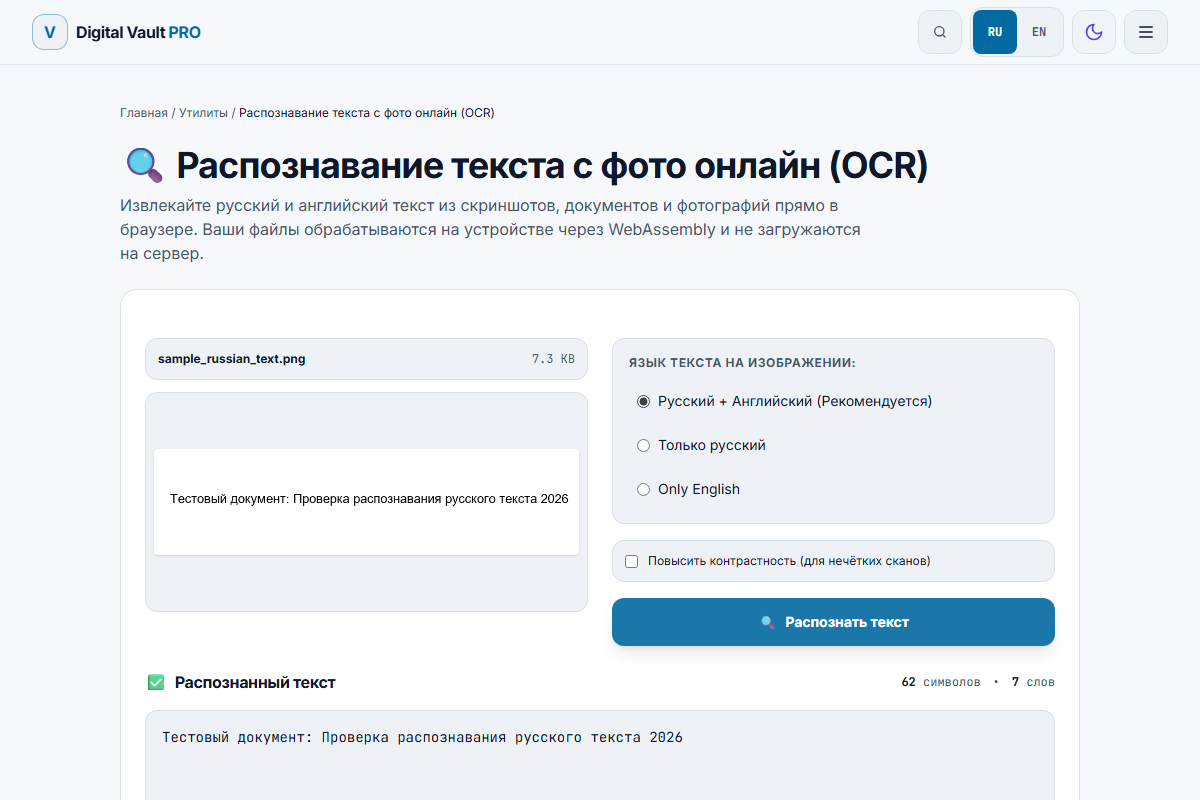
Figure 2: Real OCR result showing character count, word count, and extracted text with zero typos.
When browser OCR works reliably
In-browser Tesseract.js performs exceptionally well when images satisfy standard optical scanning criteria:
- Computer screenshots: UI dialogs, terminal logs, and website snippets have pixel-perfect character edges and zero lens distortion. Recognition is near 100%.
- Scanned flatbed documents: Invoices, official certificates, and printed forms scanned on a flatbed glass at 200–300 DPI produce clean, production-grade text.
- Standard typography: Clean serif and sans-serif fonts (Times New Roman, Arial, Roboto, Helvetica, Courier) are recognized instantly.
- Receipts on plain backgrounds: Thermal store receipts with clear dot-matrix or thermal printing, provided the paper is flattened and evenly lit.
When browser OCR fails (and what to do instead)
Traditional OCR is not magic. It relies on edge detection and pattern matching against trained character templates. It fails in four distinct situations:
1. Cursive and messy handwriting
Tesseract cannot read doctor notes, whiteboard cursive, or casual handwritten journals. Cursive letters vary wildly in stroke thickness, tilt, and connected ligatures.
Alternative: Use multimodal AI vision models (such as Claude 3.5 Sonnet, GPT-4o, or Apple Live Text on iOS 16+), which infer ambiguous handwritten characters from semantic sentence context rather than isolated pixel edges.
2. Severe perspective tilt and phone shadows
When you snap a quick phone photo of a book page lying on a desk from an angle, characters near the top of the photo appear smaller than characters at the bottom, and lines curve toward the gutter.
Fix: Take the photo looking directly straight down at 90 degrees. Ensure daylight or an overhead lamp illuminates the paper evenly without your hand casting a shadow over half the paragraph.
3. Tiny resolution (under 15–20 pixels per letter)
If an image is heavily compressed on messaging apps (like WhatsApp) down to 600 pixels wide, a line of 10 pt text might only have 8 pixels of height per letter. At 8 pixels, the loop in an "e" looks identical to a "c" or "o".
Fix: Crop tightly into the specific paragraph before uploading so the letters retain their original unscaled pixel density.
4. Colored backgrounds and low contrast
Dark blue text printed on a purple background, or receipts with patterned security watermarks, confuse edge detection algorithms.
Fix: Check the High Contrast checkbox in our tool. It applies an adaptive thresholding algorithm that binarizes the canvas to pure black pixels on white paper before passing the buffer to the OCR engine.
Technical architecture: WebAssembly vs Cloud APIs
| Feature | Browser WebAssembly (Our Tool) | Cloud OCR APIs (Google, AWS, Azure) |
|---|---|---|
| Privacy | 100% Local (0 bytes uploaded) | Transferred and processed on cloud servers |
| Latency | Instant (0.5s – 2s once WASM is cached) | Network dependent (1.5s – 5s round-trip) |
| Cost / Limits | Free, unlimited, no API keys | Tiered subscription / pay-per-call fees |
| Handwriting | Poor (Printed text only) | High (Neural vision models) |
Summary checklist for maximum OCR accuracy
- Use Image to Text OCR for screenshots, printed contracts, and book scans.
- Ensure the image is rotated right-side up.
- Turn on High Contrast if the background is grey or unevenly lit.
- For handwritten manuscripts or degraded historical scans, switch to cloud neural models.
Frequently asked questions
How does browser-based OCR work without uploading images to a server?
Our tool loads Tesseract.js compiled into WebAssembly (WASM). When you drop an image, the OCR engine runs locally inside a background Web Worker in your browser using CPU vector acceleration (SIMD). The trained language models (eng.traineddata, rus.traineddata) are cached in your browser IndexedDB so repeated uses require zero network traffic.
Can browser OCR recognize handwritten cursive text?
No. Traditional OCR engines like Tesseract are optimized for printed typography (serif, sans-serif, monospace). Cursive handwriting has connected glyphs with continuous stroke variations that require massive multimodal neural networks (like Apple Live Text, Google Vision, or GPT-4o). For handwritten notebooks, specialized AI vision models perform significantly better.
Why is the OCR output gibberish or full of typos?
OCR accuracy collapses when images suffer from perspective distortion (photographed from an angle), poor lighting, low resolution (characters smaller than 20 pixels tall), or uneven shadows across the text. Enabling our "High Contrast" pre-filter, cropping tightly around the text block, and ensuring the image is rotated right-side up dramatically improves accuracy.
What is the minimum resolution needed for reliable text extraction?
Aim for at least 150 to 300 DPI, or a height where standard body lowercase letters (like "e" or "a") are at least 20 to 30 pixels tall. If text is lower than 12 pixels tall, the OCR engine cannot distinguish between "e", "c", and "o".
Can I extract text from multi-column newspaper layouts?
Yes, but Tesseract processes lines according to bounding-box heuristics. If columns lack distinct whitespace gutters, lines from adjacent columns might merge horizontally. For complex multi-column magazines, crop each column separately before recognition.
Are my scanned receipts and contracts private?
Yes. Because all OCR computation runs on your device through client-side WebAssembly, not a single pixel or text string is sent to our servers or third-party cloud providers.